Up next in 10


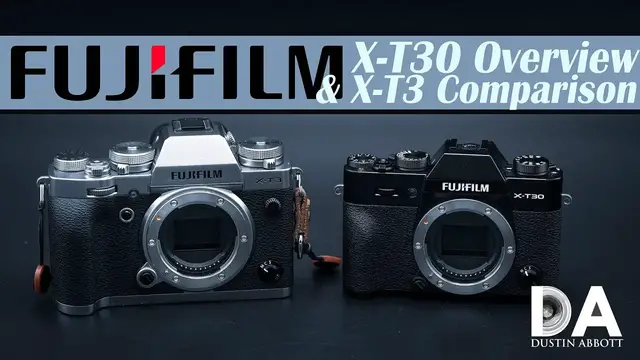
Fujifilm X-T30 Hands On Overview and X-T3 comparison | Photographer Dustin Abbott takes a detailed look at the features and performance of the Fujifilm X-T30 along with showing a number of photos from it | See more photos at the image gallery here: http://bit.ly/XT30gallery | Purchase the FUJIFILM X-T30 @ B&H Photo https://bhpho.to/2IraqVH | Amazon https://amzn.to/2EZyOg4 | Amazon Canada https://amzn.to/2EVVQVm | Amazon UK https://amzn.to/2QVINbf | Amazon Germany https://amzn.to/2MyaSXt | Ebay http://bit.ly/fujiXT30
Purchase the Fujinon XF 18-55mm F2.8-F4 @ B&H Photo https://bhpho.to/2IskzkR | Amazon https://amzn.to/2EZxOIP | Amazon Canada https://amzn.to/2KCAoZ1 | Amazon UK https://amzn.to/2R5Cli1 | Amazon Germany https://amzn.to/2WXVpUo | Ebay http://bit.ly/fuji1855OIS
Want to support this channel? Use these affiliate links to shop at:
B&H Photo: http://bhpho.to/1TA0Xge
Amazon: https://www.amazon.com/shop/dustinabbott
Ebay: http://bit.ly/DustineBay
Make a donation via Paypal: paypal.me/dustinTWI
Get a discount off all Skylum Editing Software (Luminar, Aurora HDR, AirMagic) by using code DUSTINHDR at checkout: http://bit.ly/LuminarDLA
Become a Patron: https://www.patreon.com/dustinabbott | Check me out on: Personal Website: http://dustinabbott.net/ | Sign up for my Newsletter: http://bit.ly/1RHvUNp | Instagram: http://bit.ly/DLAinsta | Google+: http://bit.ly/24PjMzv | Facebook: http://on.fb.me/1nuUUeH | Twitter: http://bit.ly/1RyYxIH | Flickr: http://bit.ly/1UcnC0B | 500px: http://bit.ly/1Sy2Ngu
My filming setup: Sony a7R III: B&H Photo: https://bhpho.to/2D6ibNO or Amazon: http://amzn.to/2CNxOvH | or | Sony a9 @ B&H Photo: https://bhpho.to/2HyWIyt or Amazon: https://amzn.to/2s1vYE0
Tamron 28-75mm F2.8 RXD @B&H Photo: https://bhpho.to/2FA00la or Amazon https://amzn.to/2G2kaEr
Lights: Rotolight AEOS @B&H Photo https://bhpho.to/2IK7mqV | Genaray Contender @B&H Photo: https://bhpho.to/33HbGNM | and Aputure AL-MW: https://bhpho.to/2N3MtZV
DISCLAIMER: This video and description contains affiliate links, which means that if you click on one of the product links, I’ll receive a small commission. As an Amazon Associate I earn from qualifying purchases.
Show More Show Less View Video Transcript
0:00
Hi, I'm Dustin Abbott and I'm here today to give you an overview of the new Fuji X-T30
0:12
And this of course represents their kind of lower level of their APS-C mirrorless cameras
0:18
and so it slots underneath like the Fuji X-T3 that I reviewed last year
0:23
However, as what we're going to see today, the X-T30 inherits a lot of the good things, at least under the hood, that the X-T3 had
0:32
And so it gives us an opportunity to see at how a much lower price point, $899 versus $1,399, that this camera gets a lot of goodness attached to it
0:43
And may possibly be a camera that you might be interested in if you're on a tighter budget or interested in what Fuji has to offer
0:51
and your budget doesn't quite go to the X-T3 level. X-T3 is a fantastic camera
0:56
but the X-T30, as I noted, does inherit some of the goodies. I will highlight and contrast some of the similarities and differences in this review today
1:06
and so it will maybe give you an idea of, as I'm going through the things that differentiate the two lineups
1:12
you need to be making a determination whether or not any of those are deal-breakers for you
1:16
There are some features that look really good on a spec list, but not everybody needs them. And so I think it's really important as consumers to make informed
1:25
decisions based upon reality, what we actually need and what we don't. So let's jump in and let's
1:31
take a closer look at the overview of the design, the specs, the handling of these cameras. And then
1:38
we'll come back and we'll take a look at a few photos together as well before we wrap things up
1:43
today. Now, first of all, the X-T30 represents a much smaller, more compact body, as you can see
1:49
in basically every detail. It's actually quite a small little camera with a lot packed into it
1:55
But just to give you an idea that with the X-T3 with a battery and memory card comes in at 539
2:02
grams or 1.19 pounds, while the X-T30 is only 383 grams or 13.51 ounces. In terms of price point
2:13
the XT30 comes in at $899, while the XT3 comes in at $1,399. In terms of the basic dimensions
2:24
the XT30 is 4.7 by 3.3 by 1.8 inches, or 118.4 millimeters by 82.8 by 46.8 millimeters. And so
2:38
pretty compact and that compares to 5.2 inches by 3.7 inches in height 2.3 inches in depth for the
2:49
XT3 or that's 132.5 by 92.8 by 58.8 millimeters and so as you can see that is a sizable difference
2:58
and and so in both size you know physical size and weight the XT30 is quite a bit smaller now
3:06
Now part of the trade off for that is that the X-T3, you know, while it's still not tall enough for hands my size, it has a more robust grip
3:15
It's a little bit easier to hold. Whereas the X-T3 is really small for those of us with bigger hands and not nearly as much of a grip to hang on to
3:26
Now the X-T30 inherits the sensor from the X-T3, which is really one of Fuji's best
3:33
It's a 26.1 megapixel X-Trans CMOS sensor. They both use the fourth generation processors, and so X-Processor 4 that is in them
3:45
So robust. Also shared in their basic design is that they share the same battery pack
3:52
And so it's a 1260 mAh rated size battery pack. And so as it's on the X-T30, it gets a little bit higher rating from SEPA
4:06
It's rated at 390 versus 380 shots. And so, you know, maybe a negligible difference, but, you know, it is a minor difference there
4:15
Now, unfortunately, the X-T3, one of the areas where it's set aside is the more pro body
4:22
It's got two card slots, and it has the much preferred, at least for me, side compartment for accessing memory
4:30
In this case, on the X-T30, the memory card is slotted down here in the battery compartment
4:36
One of the major liabilities for that is if you're doing video or tripod work
4:41
and you have a quick release plate mounted, as you can see, there is basically no way
4:49
even if I have this turned to the side, to access the memory card door with a quick release plate
4:55
in place. And so that to me is a liability because it means that you're going to have to always
5:01
say for someone like me who shoots video for my segments, you're always going to have to remove
5:06
the quick release plate to access the memory card door. Whereas with the X-T3 or something similar
5:14
I mean obviously the side door is never going to be impeded by an actual quick release plate being mounted there So as noted there only one card slot here compared to the two card slots on the X
5:29
You know, a couple of other areas where they, you know, they kind of limit functionality is that
5:34
in terms of maximum sync speed for flashes, it's 1,250th of a second on the X-T3. It's only 1,80th
5:43
or only 1 1 80th of a second on the XT30. Furthermore, they limit the mechanical shutter
5:49
to, you know, instead of a 1 8,000th of a second, it is 1 4,000th of a second on the XT30
5:57
However, you know, both of them have the option of going to an electronics shutter where you can
6:02
go up to a maximum of 1,000, 1,32,000th of a second. And so you do have an option to go higher
6:13
if you're using the electronic shutter there. Both of them have a similar AF system, which has
6:21
2.16 million phase detect autofocus points, 425 selectable. And so you have a few less physical
6:31
controls for accessing that on the XT30, but you do still have the little joystick that helps with
6:38
that. And beyond that, you are able to select an autofocus point and even to take a picture through
6:46
that. And so you can touch this little box and choose what you're going to do. So I can switch
6:51
that to where I'm just choosing an AF point. And so as you can see, touchscreen is fairly responsive
6:58
not quite as good as Canon's. On that note, yeah, let's jump into the Q menu, which in this case
7:04
the Q menu is located on this. Unfortunately, it does mean that there are going to be some settings
7:09
where you inadvertently touch that. And so, you know, there's less real estate to work with here
7:15
And so it is, you know, at least as far as the Q menu goes, you can access functionality based
7:22
through that. And so that's nice to see that you have some control unlike Sony cameras where you
7:29
have no menu control under any settings. However, if you go into the full-blown menus, you don't
7:35
have any kind of touch. They're not designed for touch and you're going to have to navigate
7:39
doing this. And you can also select, if you click it on that, you can select through that
7:46
Now, as far as the physical controls go as well, as you can see, there are fewer physical controls
7:52
here. And, uh, and so, you know, while there is, if you look at the top, there are a similar
7:57
number of dials here at the top. What is different is the fact that, you know, one of these here
8:04
you can see that it's, that's accessing the flash, which by the way, there is a built-in flash
8:10
on the X-T30. Whereas the X-T3 relies on a, you know, a small accessory flash that is included
8:17
but you do have to remember to bring it along. Flash is incorporated here. So for some people
8:23
that certainly could be an advantage there. But on the X-T3, what you have is you have a secondary
8:30
layer underneath the top dial. There's also like a mode dial. And so they're kind of two-layer
8:36
dials and that's on a couple of these. Also over here, you have your metering options on a similar
8:43
type setup here. And, and so, um, you know, you've got two layers on that where you are missing that
8:50
when it comes to this here. And so there is, there is, again, there's, there's just one dial
8:56
here and that is just for switching between just two basic modes. Um, you can go into an auto mode
9:02
or you can get off of auto mode on that. Now, beyond that, they both have exposure compensation
9:07
they do have a similar control of shutter and then also this is where you would access going into
9:14
and you can have automatic shutter selection you can actually physically can choose a certain
9:19
selection then you can also go into this where you're accessing the t mode where you're actually
9:26
using a dial to access you know one of the two depending on how you have it set up
9:30
to access your shutter speed and then also you can access bulb mode through there as well
9:36
You've got a mode dial over on this side as well. Now, in this case, the mode dial is actually the secondary control
9:44
So what you're missing over here is the ability to select ISO via one of these top dials
9:51
And so you're going to have to access ISO as we just showed by accessing the Q menu is the most logical way to do that
9:59
And so a little less physical controls when it comes to that. Now, they do have one of Fuji's trademarks in terms of having a dial at the front that allows you to easily access either single shot for your AF, continuous AF, or manual focus
10:13
And so that's certainly a nice thing to have. But outside of the basic dial here, you do have fewer controllable buttons
10:22
You have a directional pad on the X-T3 that's missing. You also have a couple of different function buttons that are incorporated in different places here at the front as well
10:32
And so you know you just have a little bit more physical controls on the X That being said the X has more physical controls than say what something like the Sony A6000 series does And so you know overall not bad there
10:50
Now, in terms of the basic frame rate with mechanical shutter, you get higher burst rate
10:58
on the X-T3. You have 11 frames per second. X-T30 in mechanical, you are limited to 8 frames per
11:04
second. Also, the buffer is a little more shallow. And so, whereas, you know, at 11 frames per second
11:11
you can get 145 JPEGs or 42 RAWs in the buffer. On the XT30, you only get 90 JPEGs or 18 RAWs
11:20
So, obviously, particularly in RAWs is where that buffer limitation shows up. Now, you can go into
11:26
an electronic shutter mode on either one of these. And on electronic shutter mode, you can actually
11:31
move up to 20 frames per second, you know, with the full sensor. Or you can go up to, and like they
11:39
call it a sport mode, up to 30 frames per second at a reduced 16.6 megapixel. So like a crop mode
11:46
basically for that sport mode. Now at the full 20 frames per second, so the full readout on the X-T3
11:53
you get 79 JPEGs or 36 RAWs. So obviously even on the X-T3, you fill that buffer up really fast
12:00
either with RAWs or JPEGs. But that's unfortunately even more true on the XT30
12:06
You only have 17 RAWs. And so that means at 20 frames per second, you do the math
12:12
You have less than a second's worth before you fill that buffer. Obviously, you're going to have
12:19
to really time your moment well. And so that usefulness is reduced. And even with JPEGs
12:24
you only have 32 JPEGs, which gets you to almost a second and a half or about a second and a half
12:29
And then the same is basically true when you go into the fast sport mode, 17 RAWs and then only 26 JPEGs
12:41
And so again, you're only getting about a half second and not quite a second before the buffer fills up
12:47
And so certainly some limitations when it comes to that. And so the buffer is not as robust
12:54
Another area where they've distinguished these two is when it comes to the EVF
12:58
The EVF in the X-T3 is a larger, it's a half inch, and it's a 3.69 million dot resolution
13:08
In the X-T30, it's a smaller, it's a 0.39 inch, and it only has 2.36 million dot resolution
13:20
It's not terrible, however. I will say that there is a difference that you can see
13:25
but this is still not a terrible viewfinder when it comes to that
13:29
Both of them share a similar resolution on their LCD screen, and in both cases, they are tiltable
13:37
However, there is one difference in that you can do the full tilting on this direction
13:42
but you have only on this axis. It's two axes. On the X-T3, you also have the option of tilting on a third axis point
13:53
and so that it's more useful if you're shooting, say, in a portrait or vertical mode
14:00
And so another area where they are differentiated there. Another area when it comes to the video
14:07
both of them are very robust when it comes to video performance. However, 4K video is capped at 30 frames per second in the X-T30
14:17
whereas you get 60 frames per second in the X-T3. you also get 10-bit internal recording compared to 8-bit in the X-T30. That being said, you do
14:29
still have a lot of functionality for a sub $1,000 camera when it comes to video function
14:36
At the same time, however, it's certainly a camera like the Sony A6400 is going to be very
14:45
very competitive on the video front. Now, if you look at the side of these cameras, there are more
14:52
ports available here. You've got the full 3.5 millimeter mic and headphone monitoring. You've
14:59
got USB-C and then you've got HDMI on the Fuji X-T30. On the X-T3, you've got a little bit more
15:06
limited real estate. So you retain HDMI, USB-C, however you only have a 2.5 millimeter jack for
15:15
a microphone and then beyond that if you want to do headphone monitoring you can do it but you're
15:22
going to need a USB-C to headphone, probably 3.5 millimeter adapter which is not included
15:31
And so if you're going to monitor you need that. One thing else I will note however that is useful
15:35
is the fact that via USB-C, both of these cameras are easily chargeable. And so it doesn't have
15:43
all the limitations that say the new Canon mirrorless bodies do, where you can only charge
15:49
under certain conditions. These are pretty flexible. I've charged them off of just a USB port
15:54
say in a wall jack I charged them off of just a portable power pack And so pretty versatile when it comes to all of that One final physical differentiation is that the X does have weather sealing in the body
16:10
whereas the X-T30 does not. And so in terms of what's shared, you have autofocus system that's
16:17
shared, you have the exact same sensor and processor, and so the images you're going to
16:23
get and we'll explore that a little bit more in a subsequent episode. Images you're going to get
16:27
are fantastic, you know, fantastic in the way that out of the X-T3, a lot of people really love JPEGs
16:33
out of Fuji's and of course their actual film emulations are, you know, particularly good with
16:40
Fuji and you've got a lot of different options on what you're going to do with that and some of
16:46
their classic looks that are really great. You've got the ability to control, you know, even in
16:52
and monochrome you have the ability to you know you have sub menus there you have a yellow filter
16:57
red filter green you know etc etc things like that and you know in a lot of these you have the
17:03
ability to just make further tweaks to that that will allow you to get a really nice look you've
17:09
got abilities to control your film simulations here as well and so again just uh they're pretty
17:16
well regarded when it comes to the overall color performance. We'll also note you have the option
17:23
to do an uncompressed or a lossless compressed in your RAWs. And so if you want to save some space
17:30
you have the option to do that. You have ability to control the amount of grain, depending on what
17:35
you're looking under your Chrome. You've just got a lot of different options for controlling all of
17:41
these things. And so Fuji definitely gets high marks for you being able to tweak JPEGs. If you're
17:47
someone that wants to shoot just JPEGs and get it set up, it's certainly, you know, Fuji is a pretty
17:52
tempting option for that. I will be taking a look on a final note. I will be taking a look at the 18
17:58
to 55 millimeter as a part of this. I specifically requested this lens to be included with the X-T30
18:04
for this review, because after covering the 16 to 55 millimeter F2.8, a lot of you asked that I also
18:11
take a look at this because it's considered to be one of the best kind of kit lenses that are out
18:17
there and so I will be giving you a separate review of this lens as well. So as you can see there are
18:23
certainly areas where Fuji has differentiated these two lineups. Some of those kind of physical
18:28
aspects are logical considering the much smaller and lighter camera body and so it's hard to argue
18:35
with those. Some of those other areas, you know, like the, you know, the sync speed and, you know
18:41
basic shutter speed and even potentially the buffer depth, those are clearly areas where
18:47
Fuji is purposely differentiating their two lineups. But doing so, I think, in a fairly
18:53
logical fashion, you know, sometimes, you know, I've, my greatest area of experience has been with
19:00
Canon and sometimes the areas that Canon chooses to differentiate their lineups are a bit of a
19:04
head-scratcher in that you know there are there are pros and cons when you're comparing a lower
19:10
grade model with a higher grade model and and so i think the fuji has done a pretty good job here
19:15
of keeping everything logical as far as what i can tell now i'll show you some photos here as we
19:20
start to wrap things up there is of course an image gallery as always where you can go and you can
19:26
check out photos taken both with the 18 to 55 millimeter f 2.8 to 4 ois kit lens also i have a
19:33
couple of the cam land lenses that i reviewed the 28 millimeter f1.4 the 50 millimeter f1.1 mark ii
19:40
that allowed me to get you know kind of a more shallow depth of field look and some beautiful
19:46
photos with those so you might want to check out all of that also stay tuned because i will come
19:51
back to you with a episode where i you know i make sure that the the actual performance when it comes
19:58
So the sensor is, you know, similar as stated to the X-T3
20:02
but also give you a comparison to the sensor in the A6500
20:06
which is also representative of what you might see and more comparatively priced like the A6400
20:12
which is the exact same price. And so we'll be able to get a sense of how the, you know
20:17
the cameras compare if image quality is your priority. And so we'll take a look at that as well
20:23
So stay tuned. In the meantime, you can take a look at that linkage to the image gallery
20:27
to see more photos. There's also buying links if you'd like to purchase one for yourself
20:31
And as usual, there are links there if you'd like to follow me on social media, including now on Instagram. Also sign up for my newsletter, which gives you all the most recent
20:40
information in a nice compact fashion. And sometimes some of you say, well, I missed this
20:47
review somehow. I don't know how I missed it. Signing up for the newsletter will help to make
20:50
sure that you get all the content that you're looking for. And finally, of course, if you
20:55
haven't already you can become a patron and help support what I'm doing here and
20:59
also get a advanced screening of upcoming content every week and finally
21:04
if you haven't already please cut that subscribe button right here on YouTube thanks for watching have a great