0:10
Hi, I'm Dustin Abbott and I'm here today
0:12
to give you a review of the Soundcore
0:17
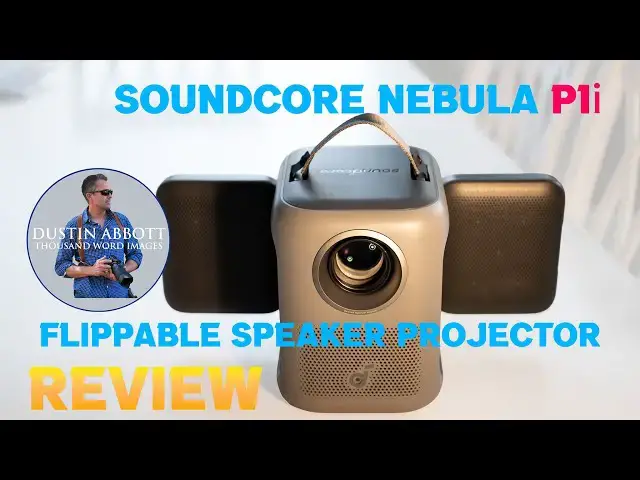
portable projector. The headline here
0:19
is, as you can see, the Dumbo ears
0:21
sticking out is that this is the first
0:24
projector that we have that actually has
0:26
flippable speakers. they can flip out
0:28
and so that they can uh project back or
0:31
they can rotate to project sound up. In
0:33
other words, you have a lot of
0:34
flexibility on how you can position
0:36
sound. So, it's going after what is
0:38
often the missing link in portable
0:41
projectors and that the sound quality
0:43
isn't fantastic. And if you're
0:44
emphasizing the portability of it, maybe
0:47
you don't have access to a better sound
0:50
option. And so this allows you to have a
0:52
far more robust sound than what you
0:54
would typically find in a projector that
0:56
cost 400 bucks or less. And that makes
0:59
it a intriguing option for a variety of
1:02
scenarios. Now, as you can see behind
1:03
me, this is my typical review screen
1:06
that I use. It's 120 in at 400 Anzi
1:09
lumens. This is not ready to display on
1:12
something this large. Probably not even
1:14
in a completely dark room, which I'm not
1:17
in at the moment. There's a fair bit of
1:18
ambient light in here. And so you're
1:21
going to have to be a little bit more
1:22
moderate in the way that you display in
1:24
your expectations. This is not what I
1:26
would consider a home theater type
1:28
projector, but rather one that can be
1:30
really useful for a couple of scenarios.
1:32
I think that because it is tough and
1:34
robust, it could be a really useful
1:36
thing to set up just on a wall if you're
1:38
looking to set up something for kids,
1:39
for example, at a a party or get
1:41
together or something like that to where
1:43
you can have entertainment for them. I
1:45
can see it being a great ad hoc solution
1:48
if you're uh getting together with
1:49
people to do watch sporting events. So
1:51
maybe you want to have multiple things,
1:53
something on a main screen, something on
1:54
a secondary screen. Could be very useful
1:56
for that. For camping, outdoor movie
1:58
nights where the criteria is not home
2:01
theater, but rather the experience. This
2:03
is going to be a great option. And
2:04
definitely at this price point, you're
2:07
not going to get better sound, at least
2:08
from any of the projectors that I have
2:10
reviewed. So, let's dive in and take a
2:12
look at the flapable speakers on the P1i
2:16
and see if this makes any sense for you.
2:19
So, this is the first time that I've
2:20
actually seen one of their projectors
2:22
sold under the Soundcore branding.
2:24
Usually, Neba Nebula is the actual brand
2:27
name that they sell under all of these
2:29
companies. They fall under the heading
2:30
of Ankor. And so I've tested things from
2:33
Solex, which is their kind of solar and
2:36
power station division, obviously Anchor
2:37
branded things, Nebula, and then
2:39
Soundcore. But this integration of sound
2:42
is kind of the key feature here. And so
2:43
this projector is being sold under the
2:45
Soundcore brand. And the headline here
2:47
is obviously the ability here to fully
2:49
rotate these speakers. And so they can
2:52
come out, as you can see, 90°, but then
2:54
they can rotate a total of 200 200° up
2:57
and down to really position them where
2:59
you want them. What's more, they are
3:01
powered by 10 watts each side, so a
3:04
total of 20 watts. There are four
3:05
passive radiators in here, but at the
3:08
same time, we've actually got an
3:10
acoustic chamber rather than it just
3:11
sound just bouncing around on the
3:13
interior of the projector. We've got
3:14
this dedicated acoustic chamber, which
3:17
means that you actually get true stereo
3:20
sound out of this. This is Dolby 2.0, 0.
3:23
And so it's not only giving you more
3:24
sound, a more robust sound, but it's
3:27
actually giving you a a little bit of
3:29
stereo separation as well. Now, I was
3:31
able to get in between the high7s and
3:33
the mid80s with a sound meter a little
3:37
over or right around a meter away from
3:39
the projector itself. And so, you know,
3:41
a pretty decent amount of sound from it.
3:44
Now, the light output here is rated at
3:47
400 ANC lumens. And that is tube
3:49
certified. So, that's like not marketing
3:51
lumens. That's actual lumens. It's on
3:53
the low side of what I like, but we'll
3:55
talk about picture quality in just a
3:57
moment. They claim a native contrast
3:59
ratio of,500 to1. That I'm sure is in
4:03
extremely optimal conditions that you're
4:05
probably never going to be able to
4:07
replicate. But again, for a cheap
4:09
projector, it does have a decent picture
4:11
quality, which we'll talk about more.
4:13
Also, rather than it being just rated at
4:15
720 as far as the resolution, we have a
4:18
full HD 1080p of resolution here.
4:22
Well, it's my favorite.
4:23
You might be able to notice that we've
4:25
actually got glass in front of the lens.
4:27
This whole optical system is is sealed.
4:29
And so, as you can see, there's always
4:31
dust that is circulating around
4:33
projectors, but it's not penetrating
4:34
here. It's easy to clean off. The lens
4:37
itself is all glass, so all of that is
4:39
good. It's also got the typical
4:41
technologies here to help us with screen
4:44
setup. And so there's adaptive
4:45
autofocus, key stinging, obstacle
4:47
avoidance, and screen fit. And it all
4:50
seems to work well. Very importantly,
4:52
these days, it is natively licensed for
4:54
Netflix, and it's running a Google TV
4:57
operating system. This handle up here at
5:00
top, which makes it easier to carry
5:01
around. It is removable fairly easily,
5:04
and so if you want to take that off, you
5:06
don't have to have that attached to it.
5:09
As far as inputs here, we have got the
5:12
DC input. We've got the HDMI, we've got
5:15
USBA, and then we've got an auxiliary
5:17
output, and then there's obviously a
5:19
port for the remote itself. This is what
5:21
the actual power brick looks like. So,
5:24
unfortunately, we are running off AC
5:26
power. There is no uh USBC type um
5:30
power, which I would prefer cuz it's
5:32
going to give you more options in an
5:33
outdoor type situation. You can probably
5:35
note that this is a pretty tough. It's
5:37
it's it's plastics, but it feels tough.
5:39
Almost like a like a kids toys kind of
5:42
thing. It feels like it could take a
5:43
little bit of abuse. And that does fall
5:46
neatly into one of my kind of case uses
5:48
for it. You can see here we do have a
5:51
nice tough adjustable uh stand in here.
5:54
It's going to allow you to give you a
5:56
fair degree of about up to about 15% of
6:00
uh your projection. but also we have got
6:02
a standard 1/4in threading here. And so
6:04
if you want to throw it on a tripod or
6:06
light stand, you've got more options
6:08
there on how to get it set up. The
6:10
remote itself is pretty standard fair
6:12
for Google TV, which means it's a
6:15
familiar button layout um with some
6:17
shortcut buttons. It is back lit and
6:19
when you tilt it up, it will light up,
6:20
so that's appreciated. You can do
6:23
hands-free and so that is useful as
6:25
well. It's got all of the stuff that I
6:27
would typically look for on this. Now
6:29
under the operating hood here we have
6:31
got 2 gig of RAM and 32 gig of ROM to
6:35
run the operating system and
6:36
connectivity is Wi-Fi 5 uh dualband and
6:42
So a few observations on the picture
6:44
itself. You do have you know a decent
6:46
amount of controls over adjusting the
6:49
picture to your preferences. Um, it's
6:51
not like you have no ranges of
6:53
adjustment as I've seen on some
6:55
projectors, but again, you're going to
6:56
hit up against the limit of that 400
6:58
anti lumens. You can only turn the
7:00
brightness so high and in most
7:01
environments, you're probably going to
7:02
be running it at 100%. But it, you know,
7:05
because of everything is optically
7:06
sealed, it's not going to be dealing
7:08
with a lot of heat. And so, that is at
7:10
least an advantage to where you're not
7:12
going to be kind of warping things by
7:14
running it at 100% brightness all of the
7:16
time. in a dark room. I could project a
7:19
screen this size with reasonable
7:21
brightness to where I mean it certainly
7:23
was watchable. You're not going to get
7:24
any kind of inky black levels or
7:26
anything because it's just not bright
7:27
enough to achieve that. But I did find
7:30
that the colors were good and accurate
7:32
and so the picture quality for 400
7:34
lumens was certainly very acceptable. I
7:37
would say that the picture quality does
7:39
compete well with other cheap projectors
7:41
that I've used before. I feel like
7:42
you're getting a little bit better
7:43
accuracy. And while 400 uh lumens is not
7:46
a lot, it feels like it's using those
7:47
lumens relatively well. So, let's talk
7:50
about some things that I liked over the
7:52
course of my review. The flippable
7:54
flippable speakers are really the
7:55
coolest thing. It gives you a lot more
7:57
sound options. You can actually shape
7:59
the sound a little bit rather than it
8:01
just being out to the side. And of
8:02
course, a lot of times the problem with
8:03
projector with the sound going out to
8:05
the side is that there's a good chance
8:07
that's not where you are. And so the
8:09
fact that you can actually point the
8:10
sound back towards you or point it up or
8:13
point it down, whatever the case may be,
8:15
even if the projector is behind you, you
8:16
can rotate those to where it's
8:18
projecting towards you. And all of that
8:20
is more useful than just shooting out to
8:22
the sides. I also like the fact that I
8:24
had no problem just natively casting to
8:26
the projector. It was very easy to uh
8:29
you know, for example, using the MBA app
8:31
to just, you know, pull down that drop
8:33
down menu, find the projector there, and
8:35
just start casting to it without any
8:37
kind of hiccups. I like the fact that it
8:39
does have Netflix certification which is
8:41
becoming increasingly important um as
8:43
they have become more stringent in what
8:45
they're allowing their app to work on.
8:48
Also the auto um autofocus the auto
8:51
keystone those features they seem to
8:53
work well and so kudos on that. The
8:55
actual projector itself it feels tough.
8:57
Now, I I don't purposely drop any kind
9:00
of thing, and I wouldn't recommend
9:01
dropping it, but I will say that it
9:03
feels robust enough that if you're using
9:05
it around kids and it gets knocked
9:07
around a bit, it doesn't feel nearly as
9:09
delicate as some cheap projectors do.
9:11
And so, I think that again, that's why I
9:12
think of that as being a good case
9:14
scenario is it feels tough enough to
9:16
handle a little bit of manhandling by
9:18
kids. And that is great. And the fact
9:19
that up front we've got glass that is
9:21
sealing it off, it means it's just going
9:22
to be a little bit easier to clean as
9:24
well in case somebody gets their
9:25
stickies on there. I also appreciate the
9:27
fact that it is very nice and quiet.
9:29
Now, obviously, because you're running
9:30
it basically at 100%, at least I am all
9:32
the time, the fan is going to be
9:34
running, but the fan is quite quiet and
9:36
so it runs at about 29 uh dB and and
9:40
obviously if you're using the onboard
9:41
sound, you're never going to hear that
9:43
fan at all because it is going to be
9:45
producing much more sound. I in testing
9:47
it, you know, at about right under a
9:49
meter away, I was getting a typical
9:51
sound in the in the high 70s and into
9:53
the mid80s in terms of the decibel
9:56
reading. So, obviously, that is going to
9:57
greatly overpower the 29 dB of a fan
10:00
running. I appreciate the fact that we
10:02
have got a solid backlit remote here,
10:05
easy to use, and again, a lot of these
10:07
Google TV rem um remotes are very, very
10:10
similar in operation. So it's not hard
10:12
to, you know, go to the routine button
10:15
placement and the fact that as you just
10:16
kind of turn it up like this, it starts
10:18
to light up. That is very useful as
10:21
well. Appreciated the fact that again if
10:23
I am connecting to another audio source
10:25
like that uh Boom 2 Plus that I
10:27
mentioned, there doesn't seem to be any
10:28
lag between video and audio and so that
10:32
syncs up well. And so again, that is a
10:34
nice secondary option that you're not
10:36
running into lag issues that make it
10:37
unwatchable. I like the fact that you do
10:39
have some at least some adjustments here
10:41
in terms of adjusting up and down for
10:43
the angle of projection and then also
10:46
even more so having that very standard
10:48
quarterinch screw on the top means that
10:50
you just have a variety of options on
10:51
what you can put it on and thus what you
10:54
can display from. It just gives you more
10:56
flexibility at getting the picture where
10:58
you want it to go. One other thing
10:59
that's interesting is that they do have
11:01
a Nebula app that gives you a lot of
11:03
controls even if you don't have the
11:04
remote control. If you have a phone and
11:05
you have that app, you can do all of
11:07
your controls of picture. You can also
11:10
even do some casting and things from
11:11
within that. So, it gives you just a
11:13
little bit more control over actually
11:15
operating outside of the physical remote
11:17
control as well. So, how about what's
11:19
not so great? I find that 400 lmmens is
11:21
basically only useful in a dark room.
11:24
And anything outside of that, you're
11:25
going to be probably disappointed in the
11:28
picture quality because it's not going
11:30
to look exceptional. in optimal
11:31
conditions, it can look fairly good, but
11:33
there's going to be a lot of situations
11:34
where it's not those optimal conditions.
11:37
Another thing that kind of surprised me
11:38
is that looking at the unit and looking
11:40
at its specifications, it feels like
11:42
this should have been a portable unit,
11:44
fully portable unit with a built-in
11:46
battery, but there is no built-in
11:47
battery here. And so, even though
11:48
they're kind of projecting it as being
11:50
something to use for camping or things
11:52
like that, you still have to have access
11:54
to AC power, not even just USBC. And and
11:57
so that means that while they're
11:59
marketing it as being portable, it's
12:00
portable in the sense as long as you
12:02
have AC to plug into. And so I do think
12:05
that a projector like this, particularly
12:06
at its size, it's a, you know, fairly
12:08
decent size projector. I think that it
12:10
probably should have had some internal
12:11
battery to at least give you long enough
12:13
to watch a full movie, for example,
12:15
without having to rely on AC power. I
12:18
also feel like in general that it's
12:20
certainly not overspeced when it comes
12:22
to the power running the operating
12:24
system. feels like there's a little bit
12:26
more lag than what I'm accustomed to.
12:27
And I did feel like setup took a little
12:29
bit longer, even as far as installing
12:32
the apps than what I typically see on
12:34
projectors. And so all of those things
12:36
adding up makes me feel like there could
12:37
be a little bit more grunt under the
12:39
hood here. And finally, the speakers are
12:41
obviously cool and that's the headline
12:43
event here. But to get that, it meant
12:45
that they had to go and create a bigger
12:48
footprint as far as the projector size
12:50
than what you're typically going to see
12:51
in this class of projector. and you
12:53
could get, you know, equal amount of
12:55
lumens even out of some of their capsule
12:57
series, something very close to it. And
13:00
so that means that it's just a much
13:01
bigger footprint than what some
13:03
competing projectors with this kind of
13:05
power output would be. Now, the audio
13:07
from those is obviously not going to
13:09
match this projector. But just be aware
13:11
of this isn't something you're going to
13:13
easily like just throw into a a backpack
13:15
or something. It's a little bit more
13:16
intentional in bringing along. And so
13:19
that is I would say the main downsides
13:21
that came up to me during my review
13:23
process. So what's my conclusion? I
13:25
think that this is a cool concept and I
13:27
think that for the right person, this
13:29
could be a perfect portable projector.
13:31
That right situation, however, is not
13:34
necessarily always going to be camping
13:35
unless you have AC power. To me, I see
13:37
it more as being optimal as something to
13:39
set up, you know, projecting on a wall
13:41
for the kids or as I mentioned, kind of
13:43
a an event where you're get getting
13:45
together with guys and you want just to
13:47
throw another game up on the wall. It's
13:49
got enough sound and enough picture to
13:51
be useful in those kinds of
13:53
applications, but it at the same time
13:55
it's certainly although in the marketing
13:57
you'll see them displaying on a you know
14:00
150in screen, you know, as you can see
14:02
that's that's not realistic. And so this
14:04
is better suited to displaying it more
14:06
of like an average TV type size, but
14:10
with the the portability that comes with
14:12
it. I do really like the toughness and I
14:14
think it's a lot of projector for the
14:16
price of about 370 bucks. And so the
14:20
value uh aspect I think is good and you
14:23
know because I do like Soundcore
14:24
products uh generally I feel like this
14:27
is going to be a product that is well
14:28
supported and is going to give you good
14:30
bang for the buck. But at the same time,
14:32
I think that it has a pretty
14:35
use case, and you need to make sure
14:37
before you buy that you fit within those
14:39
parameters. And if you do, I think that
14:41
you're going to be happy with what you
14:42
get from it. Just don't buy this as your
14:44
home theater solution. Buy this as a
14:47
portable solution for people that maybe
14:50
aren't as demanding of overall picture
14:53
quality and brightness. I hope this
14:55
review has helped you out today. If you
14:57
look in the description down below, you
14:58
can find linkage to more information and
15:00
some buying links there. As always,
15:02
thanks for watching. Have a great day
15:04
and let the light in.