Up next in 10


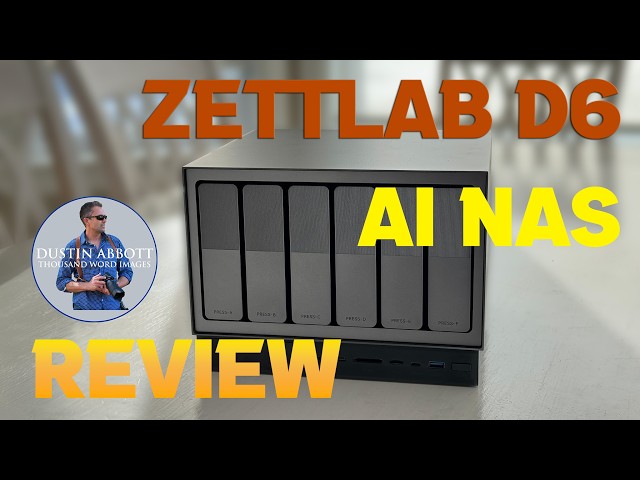
Photographer Dustin Abbott shares a deep dive review of the Zettlab D6 AI-Powered NAS System - you can create your own local cloud complete with AI search capabilities. Does it work? Find out in the review. | Purchase the Zettlab D6 at https://tinyurl.com/ZettlabD6
Check out the DA Merch here: https://bit.ly/TWIMerch | Become a Patron: https://www.patreon.com/dustinabbott | On the Web: http://dustinabbott.net/ | Sign up for my Newsletter: http://bit.ly/1RHvUNp | Instagram: http://bit.ly/DLAinsta | Facebook: http://on.fb.me/1nuUUeH | Flickr: http://bit.ly/1UcnC0B | 500px: http://bit.ly/1Sy2Ngu Follow Craig @ https://www.instagram.com/craigstoffersen/
Want to support this channel? Use these affiliate links to shop at:
B&H Photo: http://bhpho.to/1TA0Xge
Adorama: https://tinyurl.com/AdoramaDA
Camera Canada: http://bit.ly/DLACameraCan
Sony Canada: https://www.thesonyshop.ca/?ref=abbott
Amazon: https://amzn.to/3HrY64d
Amazon Canada: https://amzn.to/3qG1p18
Ebay: http://bit.ly/DustineBay
Into the AM Clothing: https://bit.ly/intotheAMda and use code DUSTIN10 for 10% off
Fioboc Clothing: https://tinyurl.com/FiobocDA20 and us code DUSTIN20 for 20% off
Make a donation via Paypal: https://www.paypal.com/paypalme/dustinTWI
=============================
Table of Contents:
=============================
0:00 - Intro and Concept
Show More Show Less View Video Transcript
0:00
[music]
0:10
Hi, I'm Dustin Abbott and I'm here today
0:12
to give you a review [music] of the new
0:13
Zetlab D6 and this is an NAS system but
0:18
with the added functionality of having a
0:21
localized AI model built into it. I've
0:25
been being getting pitched to do some
0:28
kind of NA system review for years at
0:31
this point and I've held off largely
0:32
because it's going to be a you know an
0:35
investment on my part having to get the
0:37
drives and for it and to do all of those
0:40
things um you know set it all up to
0:43
spend time with it. However, I recognize
0:45
that I could probably benefit from it in
0:48
my own life. And then also the fact that
0:50
adding on that localized AI model I
0:53
thought could be useful if I'm having to
0:55
search out of my tens of thousands if
0:58
not hundreds of thousands of images
1:00
looking for things from the past or
1:02
videos and trying to find information on
1:04
those. And so I decided I would say yes.
1:06
This looked like a slick and
1:08
sophisticated setup. So, in full
1:09
disclosure, this unit was sent to me by
1:12
Zet Lab for evaluation. That being said,
1:15
they have had no input in my actual
1:17
review, nor will they see it before you
1:19
do. This is a completely uh independent
1:22
and unbiased review. And so, we're going
1:25
to dive in and we're going to take a
1:26
look first of all at the specifications
1:28
of this unit. Now, they do have a
1:30
variety of different config
1:31
configurations. You can get them with 4
1:33
bay, six bay, and up to eight bays. And
1:36
then they have some differing levels and
1:37
we'll talk about that at the end. The
1:39
differing levels has a lot to do with
1:41
the processing power of the unit itself
1:43
and and the actual uh you know hardware
1:45
functionality that is there. So I'm kind
1:48
of reviewing somewhere in the middle of
1:49
the line the D6. There is a D6 Ultra.
1:53
This is just the normal D6. Obviously
1:54
that means it has six bays and it will
1:56
support a configuration of up to 148
1:59
terabytes of information. So basically
2:01
that is six uh 24 terbte drives that you
2:05
can have in the main base. But what you
2:07
can't see here, but on the bottom there
2:09
is an additional um M.2 drive bay. And
2:12
so you can actually put an up to 4 TBTE
2:15
M.2 drive in there as well. And so that
2:19
is uh combining all that up gets you to
2:21
148 terabytes. The price for this unit
2:24
as it sits is $499.
2:27
Now this unit has dual Ethernet ports.
2:30
The Ultra has even faster Ethernet
2:32
ports, but in this case, the faster of
2:34
the two is up to 2.5 uh gigabit
2:37
Ethernet, and it utilizes an 8 core RK
2:40
3588 processor, and that's backed up by
2:43
16 uh gig of of DDR4X
2:48
RAM in it. It obviously has the ability
2:50
to do the AI search, which we'll detail
2:53
here. You can do crossdevice syncing and
2:56
so you can, you know, mix up both like a
2:58
workstation, your PC or laptop. You can
3:01
throw in, you know, mobile and so you're
3:03
backing up your your phone and so your
3:05
data there, your photos, your videos,
3:07
etc. You can do all of that. And one of
3:10
the things that they're touting here is
3:11
that this can be used essentially as
3:12
your own private cloud. The fact that
3:14
you can access it from your mobile app
3:16
means that you can have access on the
3:18
fly to all of your data and so you can
3:20
access it and maybe avoid some expensive
3:22
cloud storage. More on that in just a
3:25
few moments. It also uh one of the
3:27
interesting things it obviously has a
3:28
lot of ports. One of the things it does
3:30
have is an HDI uh output for direct
3:33
movie playback. And so if you're wanting
3:35
to use this as a media center where
3:37
you've got tons of stuff on there, you
3:39
certainly have the option of doing that
3:41
as well. So, moving on, let's talk about
3:43
actually setting it up. One of the first
3:45
things I noted in taking it out of the
3:47
box is that everything is really, really
3:49
nicely made here. Kind of the design
3:52
language, you know, a big cube.
3:53
Basically, it kind of reminds me
3:55
actually thing that I have that's most
3:57
like this is my Xbox Series X. You know,
4:00
kind of a similar form of design here,
4:02
but you know, metals, alloys on the
4:05
outside, feels like aluminum alloy on
4:06
the outside. It has that kind of just
4:08
slick, sophisticated type look. And so
4:11
that impressed me well. And then when it
4:13
comes to actually installing the drives,
4:15
as you can see here, it is super simple
4:17
to install drives. And you don't have to
4:19
do any kind of pre-formatting or
4:22
initializing of the drives. You can do
4:24
all of that through either the mobile or
4:26
the desktop app. And you can do that. It
4:29
it does it really really quickly. And so
4:31
it's a great process. It's the most
4:33
simple process I've ever had of
4:35
initializing two drives. actually
4:37
purchased and installed um two 12 terbte
4:41
uh drives into this, you know, um
4:44
Western Digital Red NAS drives that I
4:46
installed as kind of my main backup for
4:48
RAID configuration for my photo backup,
4:50
which is the most important thing to me.
4:52
And so I installed those drives. They
4:53
were uninitialized. It took care of all
4:56
of that very, very quickly. So, no
4:57
problem there. Um as far as what you the
5:00
basic connections that you need is
5:01
you're going to need both power and
5:03
Ethernet. To my knowledge, this is not
5:05
really designed around wireless
5:06
communication. And so, you're going to
5:08
want to put it near a router where you
5:10
can actually go into a wired
5:12
configuration. What I like about that is
5:14
that it gets it away from probably away
5:17
from your actual workstation. And and so
5:20
for me, that's it's not even on the same
5:22
level in the house. And so that's great
5:24
because it just means that there's a,
5:25
you know, if there's some kind of like
5:27
localized fire or localized issue, um,
5:30
or even like a power surge in my
5:32
localized area where my PC is, it's not
5:34
going to affect this necessarily. So, I
5:37
like that. Um, and then your stage after
5:40
you've kind of plugged it in there is
5:41
basically just to download your app. And
5:43
so you have either a Mac, you have a
5:45
Mac, Windows options, you have iOS and
5:47
Android. So you can download that. And
5:50
then setting everything up is actually
5:52
really really quick. You can go from
5:54
zero to 60 in far as far as you know
5:56
installing drives, downloading an app,
5:58
initializing, configuring, and getting
6:00
ready to go. Probably do it in about 10
6:02
minutes. And so that is awesome. There's
6:05
a a big variety of options when it comes
6:08
to your various RAID options. The more
6:10
drives you have, the more options come
6:12
available and how you're going to
6:13
configure them. And so in some cases, I
6:16
wanted to have as much security as
6:17
possible when it comes to my photo
6:18
backup. I set that up in a RAID
6:20
configuration where I've got multiple
6:22
copies. If one drive fails, no problem.
6:25
But in some of the other drives, I'm
6:27
actually more just interested in
6:29
utilizing some old drives. And so, let's
6:31
take a look at what you can do in that
6:33
kind of configuration. One of the great
6:35
things you can do if you have leftover
6:37
drives and you need to back up something
6:38
larger is that by using these RAIDs, you
6:41
can actually combine these drives
6:43
together. And you've got a few different
6:44
options obviously of what you can
6:46
create. though there's going to be some
6:48
limitation as to how much you can
6:50
actually do in as far as a full RAID
6:52
with backup. But you can even just tie
6:55
them all together and although the
6:58
largest drive here is just a 6 TB I've
7:00
got a 64 and then a two TBTE drive we
7:04
can combine those together and get the
7:06
basically equivalent of a 12 terbte
7:08
drive and this is what capacity is left
7:10
over of 12 terabytes. And so obviously
7:12
that's going to be really really useful
7:14
because it just allows you to then have
7:17
one pool like it's essentially having
7:19
one large drive that you can back things
7:21
up. Now you don't have the same kind of
7:23
security whereas there could be one d if
7:26
one disc is damaged then all data will
7:27
be lost. So don't use this if you're
7:29
wanting to do serious backups. You know
7:32
you can use these in other capacities
7:33
like this and then create where you have
7:36
a actually a some backup there. But this
7:40
is a great option if you just want to
7:41
combine the drives to create a larger
7:43
storage pool. So obviously that's a very
7:46
useful, you know, aspect of this. And so
7:48
now all of a sudden I can create a video
7:50
backup space where it doesn't have the
7:52
same degree of security. So if one of
7:54
those drives fails, you know, my backup
7:55
fails. I understand that. But now I have
7:57
enough capacity to back up a 12 terbte
8:01
video drive, which happens to be the
8:02
size of what I've got on my workstation
8:05
for my video work. And so now all of a
8:08
sudden I can do a direct backup where I
8:10
can actually do the sync and keep that
8:12
updated there. So that's great. Also, as
8:14
far as the the firmware update process,
8:16
whether it's on the app, it's firmware
8:18
for this, it's software updates for, you
8:21
know, the app, all of that. Um, it seems
8:23
to function as it should, quick and easy
8:26
updates that is, you know, keeping
8:27
things moving ahead in the right
8:29
direction. And as we're going to see in
8:30
the conclusion, I think that that
8:32
continues to be necessary. So, let's
8:34
talk about those apps and the software
8:36
side of things for a moment. The basic
8:37
Zet Lab app is very clean. It seems to
8:40
follow pretty traditional Mac design
8:42
language. And so, if you're familiar
8:43
with that, then you're going to be
8:45
familiar with the the layout of
8:47
everything. There is a variety of
8:48
installable apps. I count 41 at the
8:52
moment that are available. And those
8:54
give you, you know, access in a variety
8:56
of categories. Sync and backup, very
8:58
important to me. There's media apps,
9:00
things like Plex, things for torrent,
9:02
things like that. There's utilities,
9:03
things where you can do speed tests, set
9:05
up a home server, uh some apps for
9:08
security. So, if you want to do um
9:10
two-factor authentification, there's
9:12
developer tools, there's cloud tools,
9:14
different things to configure that you
9:15
could kind of lean into as you own it to
9:17
make it a more useful tool for you. As
9:20
noted, for me, the priority was a doing
9:23
a backup. And I found that it was easy
9:25
to set up, but obviously my initial
9:28
backups were very time consuming. I've
9:30
got a little bit of a configuration
9:32
oddity whereas I've got a a split
9:36
Ethernet and phone line actually where
9:38
my workstation is and I need to have a
9:40
tech in to change that and so I can get
9:42
the full capacity of my Ethernet um when
9:45
I my initial um internet service that
9:49
split it didn't really matter because I
9:51
was you know around the limitation of
9:52
that and so it didn't limit my you know
9:54
upload or download speed. Now, as
9:56
internet's gotten faster, that's
9:58
becoming the the bottleneck in my
9:59
current configuration. So, I'm actually
10:01
using wireless at the moment at my
10:03
workstation because I can get faster
10:04
speeds there. But, it just means that
10:06
there is in rather than being able to
10:08
just kind of shoot everything right
10:10
through wires, I'm actually having to
10:12
basically do, you know, put it up into
10:16
the cloud wirelessly and then back down.
10:18
So, it's a slower process. It's it took
10:20
several days to get that that backup
10:22
done because I was backing up about 14
10:24
terabytes of data. I had a few glitches
10:26
along the way and I seem to have saw
10:28
those when I just changed the power
10:30
management on my PC. So, it wasn't going
10:32
to sleep. The software wasn't keeping it
10:34
awake. It would go to sleep sometimes
10:35
and obviously disrupt the whole process.
10:38
And so, all of that seems to be
10:39
improved. And I do like the nice, clean,
10:42
easy to use app for the sync and backup.
10:45
Easy to configuration and it seems to be
10:47
doing the job. And so, all fine on that
10:50
front. I haven't really utilized the
10:51
media side of things. I don't have a
10:54
huge need of that, but certainly I could
10:56
see the value. I have done Plex in the
10:58
past. I might do it again in the future,
11:00
and obviously having that native
11:02
functionality built into it would be
11:04
great. So, how about the AI side of
11:06
things? That was kind of the thing for
11:08
me that made me say yes to this
11:09
particular project. So, I was I was
11:11
interested in exploring that. So, first
11:13
of all, let's see what happens if we
11:15
just utilize the basic search
11:17
functionality amongst the files that I
11:18
have uploaded. So the question is is how
11:21
well does this search function actually
11:23
work and I think that my probably
11:25
conclusion is it is incomplete at this
11:28
point. Obviously I have set up I mean at
11:31
this point I've set up something like a
11:33
dozen terabytes of information on there.
11:35
So it's going to take a while probably
11:36
to do any kind of complete cataloging.
11:38
But let's just say that if I want to
11:40
search in my photos for the keyword Sony
11:43
50 mm for me the most handy thing is
11:46
going to be be able to retrieve. Now you
11:48
can see fairly quickly it comes back
11:49
with a pool of images. Uh are all of
11:52
these Sony 50mimeter? They are not. And
11:56
so um I you know it's it's of some value
11:59
but it's obviously not complete.
12:01
Obviously we've got a Sony 55mm here. I
12:03
mean that that's within the ballpark. Uh
12:05
here this is not um any kind of Sony.
12:09
And if I look down at the information
12:11
it's not really showing. If I look down
12:14
here for example, I see it was taken
12:17
with a 50 mm lens. And so, you know,
12:20
that's it is going to grab various
12:22
things. Let's see in this one. Um, if I
12:24
look down into the Moore to see where
12:25
they got that 50mm from like here, it
12:28
was shot with 100 millimeter uh lens and
12:30
so I don't necessarily, and it's a shot
12:32
of the A1, so I don't necessarily see
12:35
that. So, let's switch over to the
12:36
keywords and see what it pulls up. Uh,
12:39
searching through looking through my
12:40
keywords. here it comes back with far
12:43
fewer results and and so but in this
12:46
case I mean it is accurate that's a
12:50
title from a Sony 50 millimeter here we
12:52
can see that this is from a Sony
12:54
50mimeter review it's of the uh GM here
12:58
likewise here and so I mean that's a
13:00
little bit better if I punch in the
13:02
keyword Dustin obviously that should
13:04
pull up a lot of things since that's
13:07
going to be um within the basically
13:10
embedded in lots and lots lots of my
13:12
images and you see that that is the
13:14
case. It's going to pull up a lot of
13:17
various images. Okay, but let's see if I
13:19
go a little bit more specific and if I'm
13:21
looking for if I maybe I'm wanting a
13:23
head shot of myself. So, let's see how
13:25
it does with that. Okay, fairly quickly
13:28
it has pulled back both some old, you
13:30
know, single shots here and then also a
13:33
folder that's got further in there. And
13:35
so I mean that's you know that could be
13:37
of some value particularly if I'm
13:38
looking for something specific and maybe
13:41
I don't know where in the you know 15 to
13:45
18 years worth of images I've got on
13:47
here. I'm going to show you one other
13:49
search. I do some of the branding work
13:51
for a property called Hikes Bay. And so
13:54
I sometimes am trying to pull up images
13:56
just various images of that. So what
13:58
comes up under the semantic not so
14:00
useful. So let's try again with
14:02
keywords. And in this case far more
14:05
useful. You can see that it's pulled
14:07
either out of titles or um you know
14:10
maybe in some cases out of you know some
14:12
of the other embedded information but
14:14
you know anywhere that I have embedded
14:15
the word hikes bay it's coming back with
14:18
something quite quickly and also again a
14:21
folder that's got some other images some
14:22
of these same images but others as well
14:25
in that. So you know again I I think
14:27
that there is value here. It's maybe not
14:30
as magical as what the marketing makes
14:32
it out to be, but obviously it's going
14:33
to be simpler if you have well fewer
14:37
images and as usual it's going to come
14:39
down to how well you've got them
14:41
keyworded. Okay, we can see from that
14:43
that there are going to be some
14:44
limitations there because essentially
14:46
what I found in that kind of basic
14:48
search that it was the most the best
14:51
results came when utilizing my existing
14:54
tagging that I had done. Well, you know,
14:55
that's that's okay for me. I'm running a
14:57
lot of things through Lightroom. I I'm
14:59
I'm pretty efficient at doing correct
15:02
metadata on my stuff and, you know,
15:03
putting those uh keywords in. Maybe you
15:06
haven't done all of that. So, let's
15:07
switch over to the AI side of things and
15:09
see if it is going to be able to fill
15:11
that gap of finding things for you when
15:13
you're looking for it. Let's take a
15:15
look. All right. So, that's standard
15:16
search. So, now I have opened up the Z
15:19
AI app here. And so, now let's see as
15:22
it's going to search through my data.
15:23
I'm going to try again with that Hikes
15:25
Bay search and see how it does using the
15:29
AI. Now, obviously, that's not something
15:31
that it is kind of instinctively going
15:34
to know because it's something specific
15:36
to my work. So, let's see if it pulls up
15:39
anything here. So, it comes up with two
15:41
things. And so, first of all is images.
15:43
So, if I click on that, it basically
15:45
seems to me to be the results that we
15:47
got previously with the semantic search,
15:50
which I didn't find to be all that
15:52
useful. uh I found the keyword search to
15:54
be more useful. Obviously the folder
15:56
that's you know that's useful as a means
15:59
of finding that folder but I didn't see
16:01
any kind of functionality there that was
16:03
you know above and beyond what we had
16:05
previously seen. So let's just search
16:07
more generically for sunrise photos.
16:11
Let's see what it does. Okay, it came
16:13
back fairly quickly with a pool of
16:15
images. And so if we open that up, you
16:20
know, we see a lot of images with a
16:24
sunrise in them. And so certainly
16:26
there's some value to that. And you can
16:29
see it's, you know, because there's of
16:31
the sheer quantity of the images here,
16:34
it's going to take a little bit to
16:35
populate them. One other thing that is
16:37
interesting here is you can see that it
16:39
is assigning a kind of a certainty value
16:42
to that. So up at the top, we saw as
16:44
high as in 98%. Now, one other thing we
16:47
can do here is that this is searching
16:49
visually. And then also there is the
16:50
more basic keyword search that we can
16:53
click over to as well. And so maybe
16:55
you're looking for something that isn't
16:56
going to be obviously visually, but uh
16:59
here you can see that it's searching
17:00
through the keywords. In this case, you
17:02
know, prioritizing something that's
17:03
right in the title itself, but also
17:05
giving me a, you know, an extensive list
17:08
of photos with sunrise. Now, let's
17:10
search something that is maybe a little
17:12
less popular for my type of photography.
17:15
and see what it pulls up with if I look
17:17
specifically for cars, which again is a
17:20
category of photography that I use far
17:23
less frequently.
17:26
So once again, it pulls up this list of
17:29
cars and sure enough, as we can see as
17:31
we look visually throughout here that
17:33
it's largely showing images that have a
17:36
vehicle in there. And so again, this is
17:39
through a vis visual type search. And so
17:42
in this case it's showing you know it's
17:44
percentage of confidence. So once I have
17:46
searched up and let's say I found the
17:48
photo that I was looking for. What are
17:50
my options here? I have the option to
17:52
open the image to open its file location
17:54
to favorite that image but then also to
17:57
download it or to share it through some
18:00
other means. And so this is going to be
18:02
the greater value, particularly if I'm
18:04
using this not on a desktop, but using
18:06
it in the app to where I am maybe
18:09
wanting to get this onto my phone to
18:11
share in some other way. And so this is
18:12
where I think there could be some
18:14
potential value for this. You can see
18:16
that this OS, at least as it's running
18:19
on my computer at the moment, it's it's
18:20
a little glitchy. It still has some ways
18:23
to go. There's potential there, but it
18:25
needs some work yet. So I actually found
18:27
that the AI search definitely made a
18:30
difference. Now, what I will say at this
18:32
point with the current build and the
18:34
amount of data that I'm working with and
18:36
I had other things going on on my
18:37
computer at the same time. So, you know,
18:39
maybe not the perfect illustration.
18:41
However, I think that there is still a
18:43
little bit of glitchiness there when
18:44
you're working with large amounts of
18:46
data. That could be a limiting
18:48
principle. And so, I hope that they do
18:50
continue to do some firmware updates.
18:52
Um, when you're moving a lot of data, it
18:54
needs to be capable of handling that.
18:56
And if you are like me and you're
18:58
looking at moving a lot of data, you
19:00
might want to spend a little bit extra
19:01
money and go to the Ultra. That leads me
19:03
to my conclusion here. Now, some of the
19:06
different premises of this where it's
19:08
most valuable is obviously the basic NAS
19:11
function and that is as you know back
19:13
backup or large amounts of storage that
19:16
are outside of your actual workstation.
19:18
Uh so I think that there's obviously a
19:20
wellestablished value of an NA system.
19:22
this system works really, really easily,
19:24
very cleanly for that. Lots of RAID
19:27
options, easy to set up, easy to use.
19:29
So, as basic NAS functionality, it's
19:31
fantastic. And so, if you're buying it
19:33
just for that, you're going to be
19:34
perfectly satisfied with that. Another
19:36
thing that they're they're kind of, you
19:38
know, pushing this as an option is as a
19:41
replacement for cloud storage. So,
19:42
basically, your own private cloud
19:44
storage. I do see value to that because
19:47
what I have found very quickly in a
19:49
variety of places is that you know if
19:51
you're using the basic levels of cloud
19:53
storage you know whether it's you know
19:55
built in in your iOS iCloud storage or
19:58
it's Dropbox or um you know one drive
20:02
from Microsoft all of those things the
20:04
basic cloud storage is typically a small
20:07
amount and once you burn through that
20:08
and you start going to the paid plans
20:10
they start to get expensive fast
20:12
particularly if you need large
20:13
quantities of cloud storage. So this
20:15
could be something where it could within
20:17
two years it could pay for itself and
20:19
just you know eliminate some of those
20:20
cloud storage fees. But I will add to
20:23
that it's just it's not quite as simple
20:24
as that because obviously there's really
20:27
good integration through these major
20:28
cloud plat platforms with you know iOS
20:31
or Android in terms just kind of
20:33
building building all of that into your
20:35
basic functions with with an image for
20:38
example or anything like that with files
20:40
generally. And so you're going to have
20:41
to learn the process, learn workarounds,
20:44
learn to utilize. And so it means that
20:46
maybe in app you're going to have to
20:47
save a photo to your your photos on your
20:50
phone or whatever. It's all workable,
20:52
but just note that it may not be quite
20:54
as seamless as the paid platforms. For
20:56
some people, I think the savings and
20:58
money is going to be well worth that.
21:00
For me, I think the another great
21:02
application for this is as a media
21:04
server. Obviously, you could have
21:06
massive amounts of, you know, if that's
21:08
your thing, massive amounts of data on
21:10
there. And the fact that it's got
21:11
built-in HDMI, it's got, you know,
21:13
plenty of processing power for running
21:15
those video files. Great. And so, that
21:17
could be an application for me. For me
21:19
mostly, I'm going to be using this as a
21:21
local server backing up data. But also,
21:24
I think, you know, occasionally having
21:27
that capability of searching, you know,
21:29
in the AI when I'm looking for a
21:31
specific image, it could be useful to
21:33
me. And of course, because I am
21:35
basically cloning what's on my computer
21:37
workstation, if I can find it there,
21:39
I'll know exactly where to go on my
21:40
workstation if I wanted to just pull it
21:42
up locally. And so, I think that that AI
21:44
functionality is going to have some
21:46
usefulness. As far as the actual build
21:49
and quality of design here, it's great.
21:52
I mean, very uh high quality build. Um,
21:55
it seems to do the the job that it
21:57
wants. I like the fact I mean, where
21:59
it's set up, you can hear it worring and
22:01
working. You know, again, it's sorting
22:02
through massive amounts of data that
22:04
I've transferred on there. So, I'm
22:05
hoping that the AI functionality and
22:07
those things get better the longer that
22:09
it's had time to sort and process and
22:12
get used to all that. But what I love is
22:14
that while it's doing all this, number
22:15
one, I'm not listening to it because
22:17
it's not it's in a basement location
22:19
away from me. I also love the fact that
22:21
it's as it's doing all of this work,
22:23
it's not slowing down my workstation as
22:25
I've had to do with backups in the past
22:27
as I try to do all of that. And so I
22:30
really love kind of separating those two
22:32
things. So that's great. So I would say
22:35
this is a sleek, well-made design and if
22:37
they continue to support it uh in the
22:40
future, it should get better and better.
22:41
I think that there is still more need
22:44
for firmware and software improvements
22:46
in the future. And I would say that if
22:48
you're looking at some of the quirks
22:49
that I've run into and you say, I
22:51
probably could use more performance,
22:52
take a look at the ultra models. The
22:54
ultra models can also give you, you
22:56
know, options is terms of the quantity
22:59
quantity of bays all the way up to eight
23:01
bays, but it also moves you up to an
23:03
Intel 14 core, 18thread processor. The
23:06
RAM doubles to 32 gig. It's DDR5 instead
23:09
of DDR4X. So, I mean, it's just it's the
23:12
hardware specifications are improved and
23:14
that may be worth it for you in the end.
23:17
In the end of the day, however, if
23:18
you're looking for an NA NAS system, I
23:20
would say that there's a lot of good
23:22
here to consider. I think the AI search
23:25
functionality is a work in progress, but
23:27
like all things AI, it seems to be
23:29
getting better and better, faster and
23:31
faster. And I will note that this is a
23:33
local AI. This is not involving any of
23:36
your data going out um into the cloud
23:39
and, you know, thus being open to
23:42
potentially being taken. And so I do
23:44
like that that aspect of it as well. As
23:47
it stands for this, you know, 500 bucks
23:49
for the basic unit, though you're going
23:50
to have to buy drives as well. So it's
23:52
going to be an upfront initial
23:53
investment. I think that in the long
23:55
run, it's one of those things if you
23:56
take the hit and you spend the money
23:58
down the road, particularly if you have
23:59
a drive failure on your main computer,
24:01
you're going to be really happy you have
24:02
those backups sitting there. I'm Dustin
24:05
Abbott. If you want more information,
24:06
check out the description down below.
24:08
There is some linkage there where you
24:09
can check out where you can purchase. As
24:11
always, thanks for watching. Have a
24:12
great day and let the light in.