Up next in 10


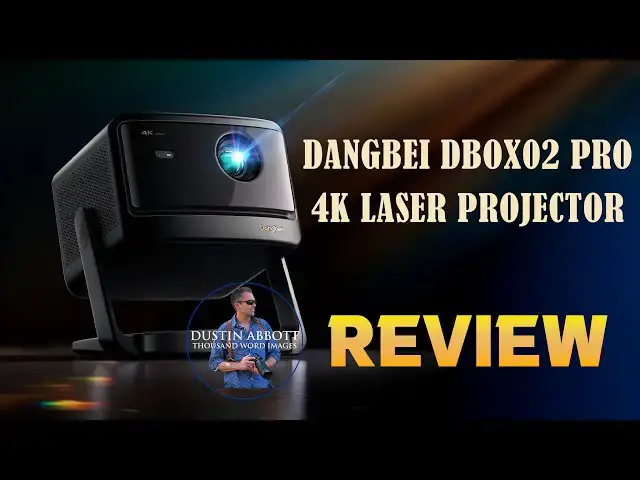
The Dangbei DBOX02 Pro is a legit 4K dual laser projector that is capable of producing a beautiful picture. It can be had (at the moment) for under $1000. Is it worth it? Check out Dustin's review to find out. | Purchase the DBOX02 Pro @
Check out the DA Merch here: https://bit.ly/TWIMerch | Become a Patron: https://www.patreon.com/dustinabbott | On the Web: http://dustinabbott.net/ | Sign up for my Newsletter: http://bit.ly/1RHvUNp | Instagram: http://bit.ly/DLAinsta | Facebook: http://on.fb.me/1nuUUeH | Flickr: http://bit.ly/1UcnC0B | 500px: http://bit.ly/1Sy2Ngu Follow Craig @ https://www.instagram.com/craigstoffersen/
Want to support this channel? Use these affiliate links to shop at:
B&H Photo: http://bhpho.to/1TA0Xge
Adorama: https://howl.link/nt4zdz1goa7ql
Camera Canada: http://bit.ly/DLACameraCan
Sony Canada: https://www.thesonyshop.ca/?ref=abbott
Amazon: https://amzn.to/3HrY64d
Amazon Canada: https://amzn.to/3qG1p18
Ebay: http://bit.ly/DustineBay
Into the AM Clothing: https://bit.ly/intotheAMda and use code DUSTIN10 for 10% off
Fioboc Clothing: https://tinyurl.com/FiobocDA20 and us code DUSTIN20 for 20% off
Make a donation via Paypal: https://www.paypal.com/paypalme/dustinTWI
=============================
Table of Contents:
=============================
0:00 - Intro and Concept
Show More Show Less View Video Transcript
0:10
Hi, I'm Dustin Abbott and I'm here for
0:12
another projector review. This today is
0:14
of the Dong Bay DBOX2
0:18
Pro. This is also for some reason called
0:20
the Mars Pro 2 and it is an update of
0:24
last year's projector which didn't have
0:26
the Pro attachment to it. So, now we
0:29
have what was already a strong value in
0:32
the 4K laser projector uh class, and
0:35
we've gotten some key updates here,
0:37
including a built-in 360°ree gimbal that
0:40
allows you to tilt and get your angle
0:42
set up more properly. It's got some key
0:46
upgrades in terms of AI assistance for
0:48
image setup, you know, key stinging,
0:50
things like that. And then now we have
0:53
dual red and blue lasers. And so a
0:55
little bit different projecting
0:57
technology. So today we're going to dive
1:00
in and take a look at not only the
1:01
specifications, but also take a little
1:03
bit closer look at the picture quality
1:05
and what you can get out of this
1:07
projector and give you an assessment of
1:09
what I liked during my review period,
1:11
what I didn't like, and what kind of
1:13
value I think it is. So let's start by
1:15
taking a look at the projector itself,
1:17
its specifications, its build, its
1:19
features, and so you can get familiar
1:20
with it. All right, let's take a closer
1:22
look at the specifications and also the
1:24
design here. Now, one thing that you
1:27
will notice probably already is that
1:30
while this piano black it looks nice and
1:32
sophisticated, it is a bit of a
1:34
fingerprint magnet. And so, one thing to
1:36
be aware of, we do have glass over this
1:39
uh front lens here. And so, it's
1:42
actually out here, not down at the lens
1:44
itself. You can't see it because
1:45
fortunately, it's clean at the moment,
1:47
but that is nearly flush. And so, it's
1:49
easy to clean. So that part I do like.
1:51
Infrared sensor there on the front for
1:54
receiving the signal from the actual uh
1:56
remote itself. Taking a quick look at
1:58
the back, you can see our port assembly
2:00
here. So we've got a 3.5 millimeter,
2:03
we've got two USB uh a drives, we have
2:07
got HDMI uh eer, a regular HDMI, we've
2:11
got an optical output, and then we also
2:13
even have an Ethernet or LAN port coming
2:16
in. On the sides here, we do have on
2:20
both sides, we have 12 watt rated
2:23
speakers. There's a 600cc acoustic
2:26
chamber on each side to allow for good
2:28
stereo sound. Now, the other thing here
2:31
is obviously we do have this now
2:34
integrated uh stand here, which does
2:36
allow you obviously 360°ree panoramic
2:39
rotation and then also you can rotate up
2:43
and down. You can rotate up 120 degrees
2:47
on this vertical axis and so pointing
2:49
quite down and then all the way up if
2:51
you wanted to actually fire up at the
2:54
ceiling itself. Here's a look at the
2:56
power brick. It is not small as it seems
3:00
like none of these are. One thing I will
3:02
say that I like is that there is a very
3:05
nice imp implementation here where the
3:07
actual power cable plugs into the
3:09
integrated stand rather than having to
3:11
plug in at the back leaving potentially
3:13
if you're just doing streaming leaving
3:15
you a nice clean looking back without a
3:17
power cable sticking out. So I do like
3:19
that. And I will note that both the
3:21
ceiling and the floor stands which are
3:23
separate accessories. Those are
3:25
available. Both of them however do have
3:27
cable routing inside of them and so
3:29
allows you to get a clean look. I will
3:31
throw links in the description down
3:32
below for both the ceiling and the floor
3:35
mount. Both of them run about a hundred
3:38
bucks US.
3:40
Now, as far as what is under the hood
3:42
here, this is a 4K projector, so a
3:46
native 3840x 2160 resolution. It's rated
3:49
at 2,000, not ANC, but ISO lumens. So
3:53
ISO lumens tend to be a more
3:55
conservative rating giving you a little
3:57
bit more brightness than if it was just
3:58
2,00 lumens. Now part of the technology
4:01
for the lasers here is there actually is
4:03
dual lasers as a part of this. They call
4:06
this laser vibe maybe unfortunately
4:08
named there but it is an ALPD laser
4:11
technology with both a red and blue
4:14
lasers to reduce speckle. The actual uh
4:18
lasers are rated for a 30,000 hour life.
4:22
And so that's enough to last you
4:24
probably for most of your lifetime. It
4:26
supports HDR10, HDR10 plus, HLG, and 3D
4:31
playback. You also have the ability to
4:33
choose a variety of different color
4:35
spaces. And the one that they're
4:36
advertising is that it does display 108%
4:39
of rec 709 in terms of that color gamut.
4:43
The throw ratio, for those of you
4:44
interested in that, is 1.27. 27 to1. As
4:47
far as the audio specs, it does support
4:50
as far as the built-in audio is Dolby
4:53
audio and then D uh DTS virtual X as
4:56
well. Now, we've also got a number of AI
4:59
technologies as a part of this that will
5:01
allow you to they call it their Instapro
5:04
AI image setup. And so that includes
5:06
autofocus, auto keystone correction, a
5:09
auto screen fit. It's got obstacle
5:12
avoidance, eye protection, real-time
5:14
keystone correction, and AI brightness
5:16
adjustments. And so, this also here is
5:19
the um the a camera setting, and so that
5:21
it can actually detect for things like
5:23
auto brightness. The actual projector
5:26
weight is 4.8 kg, which isn't, you know,
5:29
super heavy, but not not something
5:31
you're going to want to be moving around
5:32
all the time. I do like down here, we do
5:34
have an actual power button integrated
5:36
into the stand, which is kind of a nice
5:39
thing. It does light up there on the
5:41
bottom. I will note this is what rotates
5:43
here. You can remove some of this to
5:45
access if you're going to put uh some
5:48
kind of mount on there, but what it
5:50
doesn't have is a standard quarter inch
5:52
mount there at the bottom. Inside, as
5:54
far as operating system, we're running a
5:56
quad core ARM Cortex A55 processor.
6:00
There are 2 gig of RAM and then also 32
6:03
gig of ROM, and it is running the Google
6:05
TV OS. Communication standards are Wi-Fi
6:08
6 and Bluetooth 5.2. MSRP is $15.99, but
6:13
it's currently selling at $899.
6:17
Um, at the moment with sales already,
6:19
it's spent a lot of time at the $1,200.
6:22
And so, probably no one is paying that
6:24
full MSRP, making this a much nicer
6:27
value if you are looking for a value
6:30
projector in this class.
6:32
So, let's talk picture quality. That is
6:34
arguably the most important
6:35
consideration in a projector in this
6:37
class. Probably most people are not
6:38
buying this so much as a portable
6:40
projector, but more to set up in a home
6:42
theater type environment. To give you a
6:45
little bit of idea of test conditions
6:46
here, what you're seeing at the moment,
6:48
this room is fairly dark. There is a
6:50
little bit of ambient light. We're in a
6:52
basement. There is some ambient light
6:54
that is coming through some windows, but
6:56
it is towards evening and that light is
6:59
not particularly bright. So, this is
7:00
close to optimal conditions here. My
7:03
screen has a gain of 1.2. It's 120 in
7:06
screen. And you can see I'm not filling
7:08
the entire screen right now. I'm
7:10
probably displaying something close to
7:12
110 in. And that is mostly because of
7:14
the way that this particular room is
7:16
configured and not being able to get the
7:18
projector up high enough. I find that
7:20
it's hard for me to get the projector
7:22
back far enough without having some kind
7:23
of obstruction of blocking screen. And
7:26
so I do wish that it had an optical
7:28
zoom. It would help me with this. And so
7:30
in optimal conditions, I do think that
7:31
the picture quality of the Mars 2 Pro is
7:34
it's, you know, it's pretty impressive.
7:36
It we don't actually have a rated native
7:39
contrast ratio here, but they do claim a
7:42
dynamic contrast ratio of 10,000 to1.
7:45
You know, all always with those kind of
7:47
figures, you have to take them with
7:48
somewhat of a grain of salt because
7:50
it's, you know, they're derived in
7:51
testing environments that are sometimes
7:53
hard to replicate out in the real world.
7:56
Now, the marketing department would say
7:58
that this can give you a picture up to
7:59
300 in. I think that that is nowhere
8:03
close to being true. If you look more at
8:04
the fine print, they recommend a screen
8:06
size up to 150 in. And again, if you're
8:09
displaying in the proper conditions, I
8:11
would say that that is fine. However, I
8:13
would not say that 2,000 uh lumens is
8:16
sufficient for a bright room. And yes,
8:19
they may market this as being both a day
8:20
and a a nighttime projector, but I would
8:24
say that realistically, unless you're
8:26
content with a more washed out picture,
8:29
this is something that is better used in
8:31
optimal condition. Now, some of the
8:33
other picture related things, I do
8:34
appreciate the fact that there is a
8:36
pretty broad range of picture
8:38
adjustments that you can make. And I do
8:40
find that out of the box that it it's
8:42
maybe a little aggressive with the
8:45
sharpening. And so you're going to want
8:46
to go into a custom profile. If you find
8:48
it a little bit oversharpened, go into
8:50
uh the custom profile that allow you to
8:52
tweak things down to and including the
8:54
actual uh sharpness there. And I back
8:57
that off a little bit and I'm happier
8:58
with the results I get out of it. It is
9:01
able to deliver a very crisp looking
9:03
picture. However, at the same time, I
9:05
wouldn't say that black levels are
9:07
extraordinarily good, and that is
9:09
somewhat of the byproduct of this uh
9:11
type of display technology. And so
9:14
they're good, but they're not great. It
9:16
does have MEMC and it will support up to
9:20
240
9:21
hertz refresh for gaming, but that is at
9:24
1080p. If you're in 4K, it's refresh
9:27
rate goes up as high as 120.
9:31
Color palette, I would say, is good. And
9:33
I've been very happy with the colors. I
9:34
feel like they're accurate. They have
9:36
nice levels of saturation without being,
9:38
you know, garish. And so overall, I've
9:40
been pretty happy with that. I haven't
9:42
like tried to professionally calibrate
9:44
this particular display. But as far as
9:46
what ordinary people are going to use
9:48
and at this price point, I think it
9:50
delivers pretty good color accuracy. So,
9:53
let's talk about some things that I
9:54
liked and some things I didn't like as
9:56
much during my review period. As far as
9:58
things that I liked, the setup process I
10:00
found to be particularly snappy. Most of
10:02
these projectors, it seems like the vast
10:04
majority of them are running the Google
10:06
TV OS. And so the setup process as far
10:09
as the actual process is almost
10:12
identical every time. You've got to
10:14
start off by pairing the Bluetooth
10:15
remote. And from there, you start to
10:17
initiate the Google TV setup and uh and
10:20
that can typically done pretty quickly.
10:22
But what it does expose to me sometimes
10:24
is how fast the processors are running
10:27
because it you have to install certain
10:29
apps because not all of the apps are
10:31
natively installed and so you choose
10:32
what apps you want and the amount of
10:34
time it takes to run that setup a lot of
10:36
times gives me a hint of you know how
10:38
quickly this runs. I found this setup
10:40
process to be quite snappy. It does have
10:42
Wi-Fi 6 so it has good you know Wi-Fi
10:45
communication and good processing power
10:47
and so I felt like that was good. Again,
10:50
if viewed in optimal conditions, I think
10:52
the picture quality is pretty great.
10:54
It's nearly as good, not as good,
10:56
particularly in the black levels, but
10:58
nearly as good as the much brighter and
11:00
much more expensive Horizon XG Horizon
11:04
20 Pro that is kind of now my main
11:07
projector that I'm using. I reviewed it
11:08
back a few months ago and I love it. I
11:11
also appreciate the fact that again,
11:12
we've got licensed Netflix. You're not
11:14
having to do any kind of workaround to
11:16
access Netflix. That is good. the
11:18
integrated uh panoramic stand. It does
11:21
work work very well for its stated
11:23
purpose. And so if you're, you know, you
11:25
have a flat surface to put it on, it's
11:27
great. I I actually like an integrated
11:30
stand a little bit more, particularly
11:31
one that you can adjust up and down
11:32
because that would help in the this room
11:34
that I'm I'm reviewing in at the moment.
11:37
I do find also that the AI adjustments,
11:39
they work well. They're seamless. They
11:42
kind of work behind the uh in the
11:44
background and so it's not disruptive in
11:46
any kind of way. They and they do their
11:48
job well. I don't have to go back in
11:50
afterward and feel like I need to tweak
11:52
in some way the keystone or anything
11:55
like that. It's doing an accurate job.
11:56
And as you can see, we've got a nice
11:58
level looking picture here without any
12:01
issue on that. And that's no manual
12:03
adjustments. That's all the auto
12:04
adjustments.
12:06
I've also found that I've been able to
12:08
sync and use Bluetooth speakers as an
12:10
external audio source without any kind
12:13
of lag. And so a good sync between the
12:15
lips and the audio. And so all of that
12:17
is working well. So a lot of good
12:19
things. I also think that as far as bang
12:21
for the buck, particularly at the price
12:23
this projector is selling at right now,
12:24
I think it gives you a very high-end
12:27
picture for the amount of money that you
12:29
are spending on it. So how about some
12:32
things that I didn't like as much? Well,
12:34
I've already mentioned one of those, and
12:36
to me, it's probably the biggest single
12:38
feature that I'm missing, and that is
12:40
that I miss the optical zoom of
12:42
higherend projectors. Uh, for a 100 inch
12:45
display, you need 2.8 meters or 9.2
12:48
feet. For a 200 inch display, you're
12:51
going to go be all the way up to 5.6
12:53
meters or 18.3 ft. So, you're going to
12:56
need a lot of room. And again, if it had
12:58
that optical zoom, I would have more
13:00
flexibility about where I could have the
13:02
projector and still, you know, fill the
13:05
screen. And so, I do miss that. I also
13:09
wish that the integrated stand, as I
13:11
showed you on the bottom, had standard
13:12
quarterinch threading because I like
13:15
the, you know, the panoramic stand
13:16
that's built into it, but I would also
13:18
like to have a little bit more
13:19
flexibility on what I'm setting it on.
13:21
And so having that quarterinch shredding
13:23
would be nice. Another thing that I'm
13:25
really disappointed in for a projector
13:27
at this class is the fact that the
13:29
remote is not back lit. That to me is
13:32
always a big mistake because you use
13:34
these projectors optimally in a dark
13:37
room and so to not have back lighting
13:39
just makes it clunkier and more
13:41
difficult to use. The projector itself
13:43
or excuse me the remote itself is not my
13:46
favorite of many of the projectors that
13:48
I have reviewed. We noted the piano
13:50
black finish and also the fact that it's
13:52
already got fingerprints on it. Piano
13:54
black looks great. It looks elegant
13:57
right out of the box, but it not only
13:59
picks up fingerprints easily, it's also
14:02
going to show off any kind of scratches
14:03
or anything that mars it like that. So I
14:06
to me that's just kind of asking for
14:07
trouble. And then I will also note that
14:11
the rating for this new projector
14:13
actually takes a little bit of a step
14:14
back. Last year's projector was rated at
14:16
2500 lumens. This one is rated at 2,000
14:19
lumens. And I recognize they've gone to
14:21
a little bit better of a display
14:22
technology, but I feel like it needs a
14:26
little bit more u light, particularly if
14:28
they're going to market it as something
14:29
that's viable for using in brighter
14:32
rooms because it isn't quite enough to
14:34
achieve that. So, what's my conclusion?
14:36
Again, if you your primary use of a
14:39
projector like this is going to be using
14:40
it in the evening and using it in a room
14:42
where you can control the ambient light,
14:45
I think that the Dong Bay DBOX2
14:48
Pro gives you great picture and a really
14:52
robust feature set. And the current
14:54
price, I think, makes it a crazy good
14:56
value for a true 4K laser projector. And
14:59
so, if you're using it in the optimal
15:00
conditions, I think it it is a fantastic
15:03
value. However, if your use involves
15:06
using it in more mixed light, I feel
15:09
like you may need to spend more money
15:10
and go to a projector that has more
15:13
actual lumen value attached to it cuz I
15:16
don't know that you're going to be
15:17
satisfied with the picture quality in a
15:19
brighter room. You lose a lot of what
15:21
makes the picture quality special when
15:23
you go to that kind of environment. And
15:26
so, bottom line, this is a great
15:28
picture, particularly at the price point
15:30
that it's selling at right now. So, it's
15:32
well worth consideration, but again, if
15:34
you're going to want to use it also in
15:36
brighter conditions, unfortunately, you
15:38
may have to spend a little bit more
15:39
money. I'm Dustin Abbott. If you want
15:41
more information, there are links in the
15:42
description down below that you can do a
15:44
little bit more research at, and there
15:46
are buying links there as well. As
15:48
always, thanks for watching. Have a
15:50
great day, and let the light in.
#Science